Champions TV 3

Champions TV 3 Channel Frequency
Champions TV 3 Frequency TP Free to Air
Champions Channel SES 9 Satellite 108.2°East LNB Type KU Band and C Band
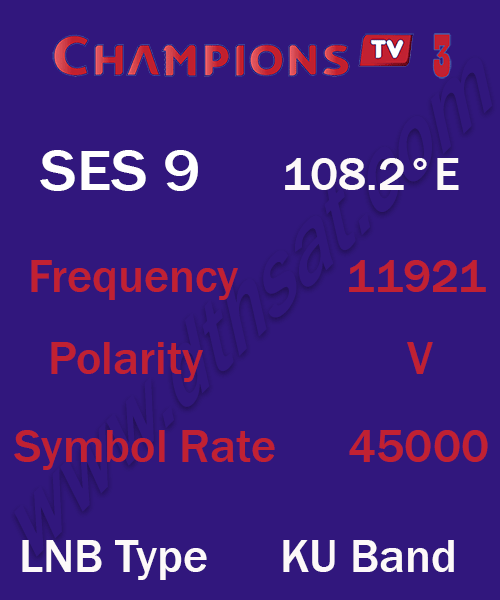
Champions TV 3 Frequency SES 9
Champions TV 3 on SES 9 Satellite 108.2°E LNB Type KU Band Updated 13-11-2026
| Channel Name | Frequency |
Polarity |
Symbol Rate |
FEC |
Champions TV 3 |
11921 |
V |
45000 |
3/5 |
Champions TV 3 on SES 9 Satellite 108.2°E LNB Type KU Band Updated 13-11-2026
Champions TV 3 Frequency Telkom 4
Champions TV 3 on Telkom 4 Satellite 108.2°E LNB Type C Band Updated 13-11-2026
| Channel Name | Frequency |
Polarity |
Symbol Rate |
FEC |
Champions TV 3 |
4180 |
V |
29800 |
3/4 |
Champions TV 3 on Telkom 4 Satellite 108.2°E LNB Type C Band Updated 13-11-2026
Champions TV 3 Satellite
Satellite List free paid all satellite LNB Type C Band and KU Band
Satellite Channel Free Satellite TV Channels List
Al-Yah-1 Satellite AL Yahsat 1 Frequency 52.5° East Channels List with full guide Yahsat List TV Channels Frequency Strong TP dish antenna setting
G Sat 97.3° East Satellite Channels Frequency List FTA LNB type KU Strong TP
Hotbird Satellite Hotbird 13° East Strong TP Frequency for Dish antenna settings TV Channels frequencies List LNB Type KU band HotBird 13.0° East
Galaxy-19 Satellite 97.0°W Strong TP Frequency for Dish antenna settings Channels list frequencies LNB C band and KU band
How to use the service reference
The table for Champions TV 3 includes Champions TV 3 at 11921 MHz, polarity V, with symbol rate 45000. Read the satellite and access notes alongside that row before entering the settings. The numbers describe one listed carrier and may be shared by several services.
When a receiver shows several versions of the same name, compare the satellite, provider and service information on each result. Standard-definition, HD and regional feeds may be separate services. Keep the existing entry until you have confirmed which version is available, and use the access note to determine whether a subscription is required.
Checking the receiver result
A signal strength reading can indicate that the receiver sees power or energy at its input. Signal quality is the more useful reading for confirming that it can lock to the selected carrier. If quality stays at zero, check the satellite selection, the LNB settings and the switch port. If several known active carriers also fail, inspect alignment and cabling before changing individual channel entries.
After the receiver locks, run a manual transponder scan and review the results by service name. Check the scan filter if the expected service is missing. A free-to-air-only filter can exclude encrypted services from the results. Save a working channel only after confirming that it matches the intended service, especially if the receiver already holds several similarly named entries.
Frequently asked questions
Which settings should I use for Champions TV 3?
Start with the relevant row in the table. Match the frequency, polarity and symbol rate together and check that your receiver is on the satellite named with the entry.
Why does a scan show signal but no picture?
Check whether the receiver actually has signal quality and carrier lock. If it does, verify that the service is still in the scanned package and that the receiver supports its video format and access requirements.
Will the same settings work in every location?
Reception depends on the satellite beam and the dish setup at your location. Compare the listed beam with your region, and use a known active transponder on the same satellite to check reception.